A more comfortable phone read
How to read books comfortably on your phone
A phone is always nearby, but a book can feel cramped on a small screen. A few practical adjustments can make it easier to settle into the story: set readable text, choose a comfortable light and colour, and use a layout that suits the passage.
Set the text for your eyes and the room
Increase the text until you can read without leaning toward the phone. Then check line spacing and brightness where you actually plan to read. A dark room, a bright screen, or sunlight on glass may change what feels comfortable. There is no single setting that works for everyone, so adjust it for the place and time. If your eyes feel tired, take a break or switch to a larger screen or paper book.
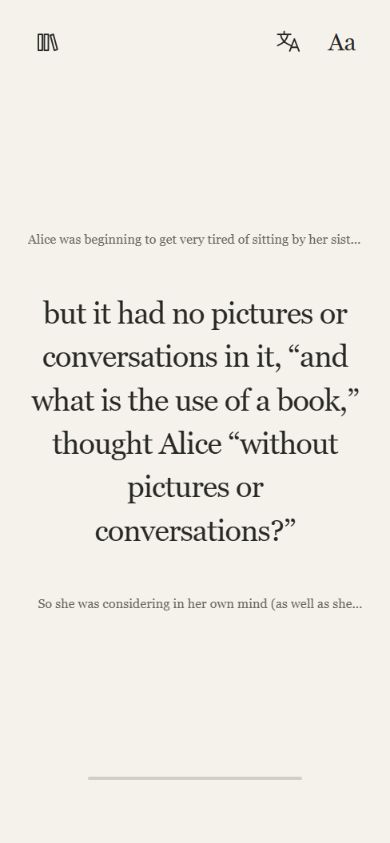
Choose a page or sentence view for the passage
A full page gives you surrounding context and can feel natural for a long scene. A focused sentence view puts one line of the story at the centre, which some people prefer for a short phone session. These are two ways to read the same book, not a speed test. Switch views when the passage asks for more context or when you want a smaller step.
Make it easy to return after an interruption
Choose one book before you start and leave it ready to reopen. Sentence saves your position as you read; guest progress stays in that browser, so clearing site data can remove it. If you lose the thread, revisit the last few lines or switch to Page view before continuing.
Reduce interruptions before you open the book
If notifications pull you away, use your phone's focus or do-not-disturb setting for the time you want to read. You do not need to block every app or set a long session. Start with a few minutes and stop when you need to. The point is to make returning to the story feel simple, not to turn reading into another productivity target.
Try a short passage and decide what feels right
Open a free book, adjust the appearance, and read a few paragraphs or sentences. Notice whether you prefer seeing the whole passage or moving through smaller pieces. Increase the text, change the theme, or switch books if the setup distracts from the story. Keep the settings that feel comfortable for you.
Common questions
Is it okay to read a book on a phone?
Many people read digital books on phones because they are convenient. Comfort varies. Adjust the text and brightness, take breaks when needed, and choose a larger screen or paper if that suits you better.
How can I make reading text easier on a small screen?
Increase the text size, use a theme that is comfortable in your surroundings, and try a layout with a manageable amount of text. A focused sentence view or a reflowable ebook can help; fixed-layout PDFs may require zooming and panning.
Will a reading app stop notifications?
A reading app does not automatically block notifications. You can use your phone's focus or do-not-disturb settings if you want fewer interruptions.
Can I change between sentence view and the full page?
In Sentence, use Page view when the surrounding passage matters, and return to sentence-by-sentence reading when you prefer a smaller step. You can choose the view that suits the book and moment.